Chapter 10 Fonts and metrics
To compute the width of a column or the height of a row, flextable has to know how wide a string is and how tall a line of text is. Neither can be guessed: both are read from the font file, with the package ‘gdtools’.
This has two consequences worth understanding, because they explain most of the surprises about the size of a table:
- the font must be found, and when it is not, the measurements are those of another font;
- the same text in two different fonts does not occupy the same space, even at the same size.
10.1 Finding the font
Font lookup is done by ‘systemfonts’: the fonts installed on the machine,
plus those registered during the session. sys_fonts() lists them and
font_family_exists() answers for one family.
library(gdtools)
font_family_exists("Open Sans")
# [1] TRUE
font_family_exists("Opne Sans")# [1] FALSEA font that is not found does not raise an error. The measurement falls back to the default sans-serif font and carries on:
tibble(
  `measurement` = c("ascent", "descent", "line_height"),
  `Opne Sans` = font_line_metrics("Opne Sans", fontsize = 11) |> unlist(),
  `sans` = font_line_metrics("sans", fontsize = 11) |> unlist()
)
# # A tibble: 3 × 3
# measurement `Opne Sans` sans
# <chr> <dbl> <dbl>
# 1 ascent 0.142 0.142
# 2 descent 0.0360 0.0360
# 3 line_height 0.178 0.178The two are identical: the typo was absorbed silently. A table whose
columns are mysteriously too narrow or too wide is very often a
misspelled font.family, so it is worth checking it once:
stopifnot(font_family_exists("Open Sans"))Listing the system fonts is slow, so ‘gdtools’ reads the list once per
session. After installing a font on the system while R is running, call
sys_fonts_reset() to see it.
10.2 A font has to exist in two places
For HTML output, the font name ends up in a CSS rule: it is the reader’s browser that needs the font, not only R. These are two separate needs, and they need two separate calls:
- R must be able to measure and draw the font: this is
register_gfont()for a Google font,register_liberationsans()and its siblings for the Liberation fonts; - the HTML page must carry the font: this is
addGFontHtmlDependency(), orgfontHtmlDependency()for the dependency object itself.
Forgetting the first gives a table whose widths were computed with the wrong font; forgetting the second gives a page where the browser substitutes a font of its own, so the widths computed by R no longer match what the reader sees.
font_set() does both at once, and returns the family names to use:
fonts <- font_set(sans = font_google("Open Sans"), serif = font_liberation("serif"))
fonts$sans
# [1] "Open Sans"
fonts$serif# [1] "Liberation Serif"Its $dependencies field holds the HTML dependencies to add to the
document, and $sans, $serif, $mono are the names to give to
flextable:
set_flextable_defaults(font.family = fonts$sans)10.2.1 Liberation fonts as a guaranteed fallback
The Liberation fonts are metric-compatible with Arial, Times New Roman
and Courier New: the same text at the same size occupies the same width.
The advances match exactly - including for accented, Greek, Cyrillic and
symbol characters, and including the kerning - and so do the line
metrics, so substituting one for the other changes no width and no height
of the table. Only the shapes of the glyphs differ, which is why the ink
box returned by strings_sizes() is not the same.
They are installed with ‘gdtools’, through its dependencies, so they are available offline and identical on every machine - which is what makes a rendering reproducible, on a continuous integration server for example.
font_set_liberation() builds a set from them alone, and
font_set_auto() tries the usual fonts of each role and falls back to
Liberation when none is found:
fonts_auto <- font_set_auto()
unlist(fonts_auto[c("sans", "serif", "mono", "symbol")])
# sans serif mono symbol
# "Arial" "Times New Roman" "Courier New" "Symbol"Downloaded font files are kept in a cache directory, which
fonts_cache_dir() returns; it can be moved with the GDTOOLS_CACHE_DIR
environment variable, created with init_fonts_cache() and emptied with
rm_fonts_cache().
10.3 The height of a line
The height of a line of text is a property of the font, not of the
letters on the line: a line of lowercase letters is as tall as a line of
capitals. font_line_metrics() reads it from the font file, following the
rule Word applies for single line spacing.
candidates <- c("Arial", "Helvetica", "Times New Roman", "Courier New", "Open Sans")
available <- Filter(font_family_exists, candidates)

metrics <- do.call(rbind, lapply(available, function(f) {
  m <- font_line_metrics(f, fontsize = 10)
  data.frame(
    font = f, ascent = m$ascent, descent = m$descent,
    line_height = m$line_height,
    ratio = m$line_height / (10 / 72)
  )
}))

flextable(metrics) |>
  colformat_double(j = c("ascent", "descent", "line_height"), digits = 4) |>
  colformat_double(j = "ratio", digits = 3) |>
  set_header_labels(
    font = "Font", ascent = "Ascent", descent = "Descent",
    line_height = "Line height", ratio = "/ font size"
  ) |>
  autofit()
Font |
Ascent |
Descent |
Line height |
/ font size |
|---|---|---|---|---|
Arial |
0.1303 |
0.0294 |
0.1597 |
1.150 |
Times New Roman |
0.1297 |
0.0300 |
0.1597 |
1.150 |
Courier New |
0.1156 |
0.0417 |
0.1573 |
1.133 |
Open Sans |
0.1561 |
0.0441 |
0.2003 |
1.442 |
ascent is the part of the line above its baseline, descent the part
below, and line_height the distance between the baselines of two
consecutive lines in single spacing. All three are in inches.
The last column is the one to look at: the line height divided by the font size. It is about 1.15 for Arial, and markedly larger for a font with generous vertical metrics. At the same font size, two fonts can therefore give rows of noticeably different heights - and the tables of this book are set in one of the generous ones.
10.3.1 What it changed
flextable used to compute the height of a line as 1.2 times the font
size, whatever the font, or as the height of the ink of the text when
that was larger. It now uses the line height of the font, multiplied by
the line spacing, as Word does. This affects autofit(), dim_pretty(),
fit_to_width() and every output:
- Word needs nothing: this has always been its rule.
-
HTML: the CSS
line-heightof a paragraph is its line spacing times the line height of its font, instead of the font size. - PowerPoint spaces lines by the line spacing times 1.2 times the font size, whatever the font. The line spacing written in the file is therefore scaled by the line height of the font divided by 1.2 - about 95.8% for Arial in single spacing.
-
PDF: the
\baselineskipis now set per cell, as in Word. It used to be the one of the document. -
Images (
gen_grob(),plot(),save_as_image()) place each line at its baseline, instead of centring the chunks in a line computed from the ink of the glyphs. Lines made of small letters no longer overlap.
The practical effect is that rows no longer vary with the letters they
contain, and that tables are a little taller with a font whose line
height exceeds 1.2 times its size. Use line_spacing() to adjust them.
10.3.2 Line spacing
line_spacing() multiplies the line height, exactly as in Word: 1 is
single spacing, 1.5 is one and a half lines. The space added by a spacing
greater than 1 is placed below the line, which is also Word’s rule.
dat <- data.frame(text = "A cell whose text is long enough to wrap onto several lines")

ft <- flextable(dat) |> width(j = 1, width = 2)
ft
text |
|---|
A cell whose text is long enough to wrap onto several lines |
line_spacing(ft, space = 2)text |
|---|
A cell whose text is long enough to wrap onto several lines |
It applies in every output format.
10.4 The width of a line
strings_sizes() measures a string: the width is the sum of the glyph
advances stored in the font, read with FreeType, without scaling and
without hinting. The same font file therefore gives the same value on
every platform.
strings_sizes("Washington AV To", fontname = available[1], fontsize = 11)# width ascent descent
# 1 1.27377 0.1093614 0.03215196The ascent and descent it returns are those of the box enclosing the
ink of this string, and so depend on its letters: they are not the ones
of font_line_metrics(), which depend only on the font. Widths come from
here, heights from there.
10.4.1 Kerning
Some pairs of glyphs are drawn closer together than their advances suggest - AV, To, Wa. This adjustment is the kerning, and it is stored in the font file. Devices based on ‘systemfonts’ apply it; the measurement does not, unless asked:
w_off <- strings_sizes("Washington AV To", fontname = available[1],
                       fontsize = 11, kerning = FALSE)$width
w_on  <- strings_sizes("Washington AV To", fontname = available[1],
                       fontsize = 11, kerning = TRUE)$width
c(without = w_off, with = w_on, difference_pct = (w_on - w_off) / w_off * 100)
# without with difference_pct
# 1.273770 1.228638 -3.543192A few percent, on a string chosen to maximise the effect. It matters
where text is drawn: gen_grob() measures with kerning, because that
is how the device will draw it, so right aligned text now ends exactly at
the edge of its cell and a space after a kerned word is no longer too
wide. It does not matter as much where a width is merely reserved:
autofit() and dim_pretty() measure without kerning, which leaves a
hair of extra room rather than too little.
Ligatures and contextual kerning are not applied; the section “Kerning”
of ?strings_sizes gives the details.
10.5 Superscripts, subscripts and equations
as_sup() and as_sub() are placed as Word places them: at 65% of the
font size, with the baseline raised by 0.34 of the font size for a
superscript and lowered by 0.07 for a subscript.
flextable(data.frame(x = "concentration")) |>
  mk_par(j = "x", value = as_paragraph(
    "C", as_sub("max"), " and ", "R", as_sup("2")
  )) |>
  autofit()
x |
|---|
Cmax and R2 |
Equations are laid out with an OpenType math font. ‘gdtools’ ships STIX
Two Math for this purpose and register_stixmath() makes it available by
name; it does nothing when a font is already registered under that name.
The layout of equations is covered with the rest of the cell content in
5.
10.6 Fonts in Word
Word picks a font per Unicode range rather than one font for the whole
run, so a table mixing Latin and East Asian text needs more than
font.family. The arguments cs.family, eastasia.family and
hansi.family cover the other ranges; they are described with the other
default properties in 12.
Keep in mind that a Word document names its fonts, it does not embed them: a font that only exists on your machine will be substituted on someone else’s, and the table will no longer have the widths you computed. This is the argument for sticking to fonts that are everywhere, or to the Liberation fonts.
10.6.1 Embedding the font in the document
The other way out is to put the font files inside the .docx archive, so
that the document carries what it needs. This is what
officer::docx_embed_font() does (officer >= 0.7.9).
library(officer)

ft <- flextable(head(cars)) |>
  font(fontname = "Open Sans", part = "all") |>
  autofit()

doc <- read_docx()
doc <- docx_embed_font(doc, font_family = "Open Sans")
doc <- body_add_flextable(doc, ft)
print(doc, target = "reports/embedded_font.docx")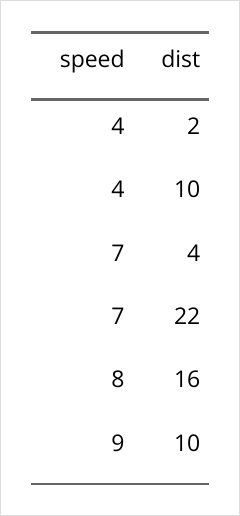
Given only a family name, it looks the font files up on the system with
gdtools::sys_fonts() and prints the explicit call it just performed:
Embedding "Open Sans" with detected font files:
docx_embed_font(
  x,
  font_family = "Open Sans",
  regular = ".../OpenSans[wdth,wght].ttf",
  bold = ".../OpenSans[wdth,wght].ttf",
  italic = ".../OpenSans-Italic[wdth,wght].ttf",
  bold_italic = ".../OpenSans-Italic[wdth,wght].ttf"
)
Copying that call into your script pins the font files, so that the document no longer depends on what is installed on the machine that builds it:
doc <- docx_embed_font(
  doc,
  font_family = "Open Sans",
  regular     = "path/to/OpenSans-Regular.ttf",
  bold        = "path/to/OpenSans-Bold.ttf",
  italic      = "path/to/OpenSans-Italic.ttf",
  bold_italic = "path/to/OpenSans-BoldItalic.ttf"
)
Each face becomes a file in the archive, in the obfuscated form Word expects, and the function also sets the document setting that tells Word to use them:
# [1] "word/_rels/fontTable.xml.rels" "word/fontTable.xml"
# [3] "word/fonts/font1.odttf"        "word/fonts/font2.odttf"
# [5] "word/fonts/font3.odttf"        "word/fonts/font4.odttf"
Two things to watch:
- The licence. Embedding a font redistributes it. The fonts under the SIL Open Font License, such as the Liberation fonts and most Google Fonts, generally allow it; many commercial fonts restrict or forbid it. Check before shipping a document.
- Variable fonts. Automatic detection can return the same file for several faces, as it does above: Open Sans is a variable font, and its regular and bold weights live in one file. Passing one static file per face removes the ambiguity.
This only applies to the Word route through officer: save_as_docx() has
no hook for it, and the other formats are unaffected - HTML carries its
fonts through an HTML dependency, PDF through the LaTeX engine.